


Reset State Keeper
Preserve selected vehicle state after a standard reset. Manage fuel and fuel consumption from a compact, customizable in-game HUD.
Reset State Keeper is a utility mod for BeamNG.drive that helps preserve important vehicle parameters when using the vehicle reset function (Insert).
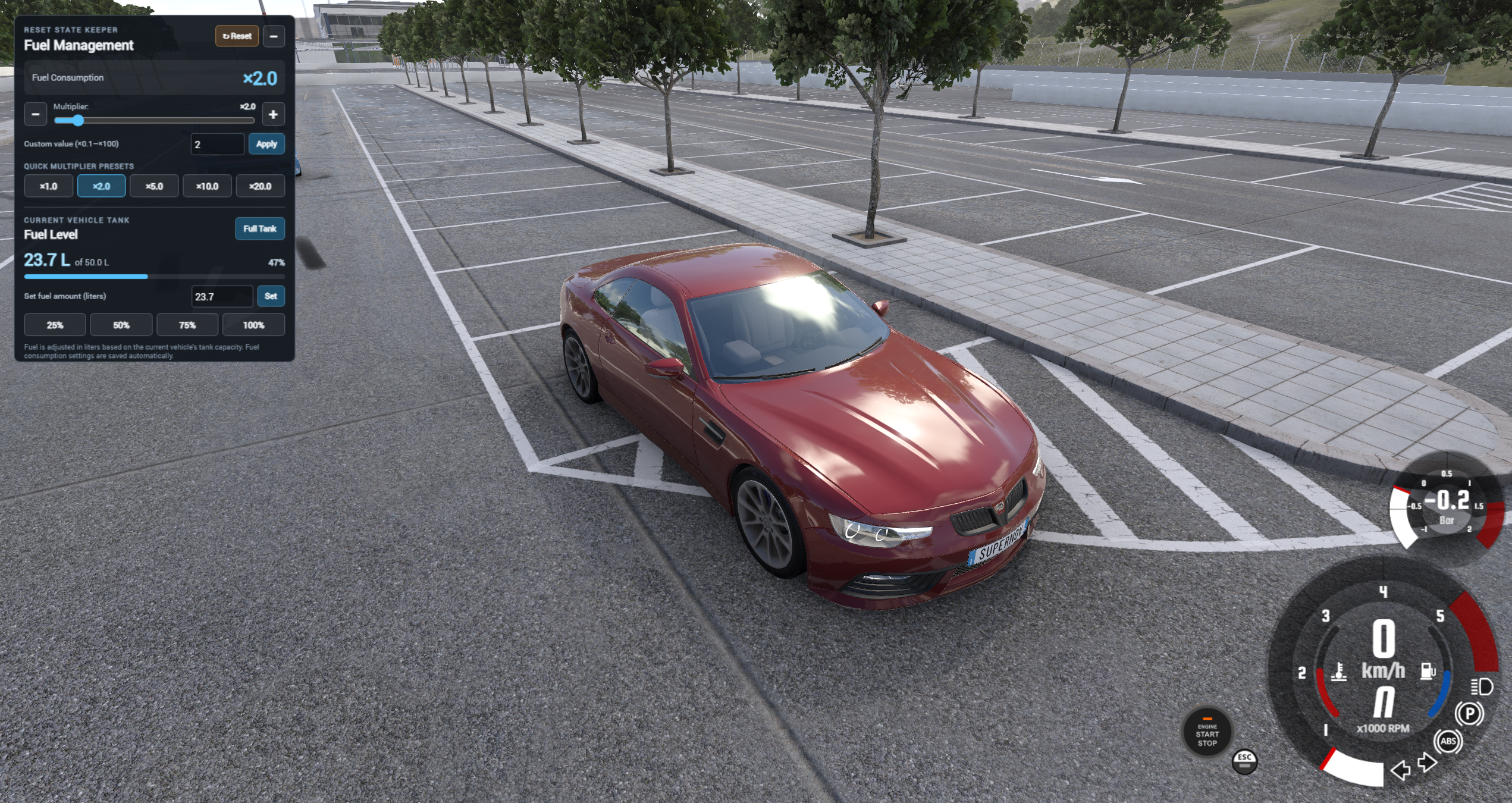
The mod includes a compact, collapsible HUD with fuel management tools, a fuel consumption multiplier and quick state reset controls.
Features
Vehicle State Preservation
Reset State Keeper caches and restores the following parameters when resetting a vehicle:
Multiple Player Vehicles
- Fuel level: Preserves the remaining fuel in supported fuel storage systems.
- Engine temperature: Preserves available oil, coolant and other accessible temperature values.
- Headlights: Restores the previous lighting mode.
- Hazard lights: Restores the previous hazard warning light state.
Each recognized player-spawned vehicle has its own cached state.
- Spawn an additional vehicle using Create New without losing the state of the existing vehicle.
- Switch between existing player vehicles and retain their individual cached states.
- When using Replace Current, the removed vehicle's cache is discarded and the replacement starts with the mod's default settings.
- AI traffic is excluded from the vehicle state tracking logic.

Fuel Management
Control your fuel level directly from the HUD.
- View the current fuel amount and available tank capacity in liters, when supported by the vehicle.
- Set a specific fuel amount manually.
- Fill the tank using the Full Tank button.
- Use quick fuel level presets: 25%, 50%, 75% and 100%.
- View a fuel level indicator.

Fuel Consumption Multiplier
Adjust fuel consumption in real time without editing the mod archive.
Clear Cached State
- Quick presets: ×1, ×2, ×5, ×10 and ×20.
- Fine adjustment using the slider and increment/decrement controls.
- Manual multiplier input up to ×100.
- The selected multiplier is saved automatically.
Compact, Customizable HUD
- Press F10 or click the HUD's Reset button to clear the cached vehicle states.
- The next vehicle reset follows the game's normal reset behavior instead of restoring the cleared cached values.
- An in-game notification confirms the cache reset.
The HUD starts collapsed and can be opened by clicking its small square fuel icon. Hold and drag the icon to move it; its position is remembered.
When opened, the panel expands toward the available screen space. In the HUD editor, you can resize its width and height independently.


Installation
Configuration
- Download the Reset State Keeper v0.8.3 ZIP archive.
- Place the ZIP file in your BeamNG.drive user folder's mods directory.
- Keep the archive zipped; do not extract it.
- Launch the game.
- Open ESC → UI Apps → Add App.
- Add Reset State Keeper — Fuel Control to your HUD.
The fuel consumption multiplier is stored in:
settings/resetStateKeeper.json
The settings file is managed in the BeamNG.drive user folder. You do not need to modify the mod archive to change fuel consumption.
Notes and Limitations
Compatibility
- Vehicle state snapshots are cached for vehicles during the current game session; they are not intended as permanent vehicle saves across game restarts.
- Fuel capacity and fuel adjustment depend on the data exposed by the vehicle. Some custom vehicles may not provide enough information for accurate fuel capacity display.
- Reset State Keeper does not repair mechanical damage or fix an engine that has been disabled by damage.
- Different vehicle configurations and third-party mods may expose different vehicle parameters.
Developed for BeamNG.drive 0.40.1
Feedback and Support
If you encounter an issue, please include your BeamNG.drive version, the vehicle involved and any relevant errors from the game log.
Feedback and suggestions are welcome.

Reset State Keeper 0.8.3
Vehicle State Persistence & Fuel Control HUD


